Automation
Practical AI Automation for Small Businesses: Where to Start
How to choose the right task to automate, where AI genuinely helps and where simple rules are better, how to keep people in the loop, and how to tell whether it was worth it.
On this page
Most of the time a small business loses to administration is not spent on difficult problems. It goes on the same small tasks repeated many times a week: copying details from an enquiry into a spreadsheet, writing a similar reply for the tenth time, finding the right version of a document, chasing the same information from customers. These are good candidates for automation, and some of them are good candidates for AI.
The hard part is not choosing a tool. It is choosing the right task, designing the workflow so mistakes are caught, keeping customer data safe, and knowing afterwards whether it was worth it. This article is a practical way to start, written for owners and managers rather than engineers.
Start with the work, not the tool
The most common mistake is starting with a product ("we should use AI for something") and then looking for a problem it fits. Start instead with a list of what people actually spend their time on.
For one or two weeks, ask the people doing the work to note recurring tasks: what triggers the task, roughly how long it takes, how often it happens, and what goes wrong. Then look for tasks that are:
- Frequent. Something done twice a year rarely justifies automation; something done twenty times a day often does.
- Repetitive and patterned. The same steps, in the same order, with predictable inputs.
- Digital already. The information arrives by email, form, spreadsheet or system, not on paper or in someone's head.
- Low-risk if a mistake slips through, at least for a first project. Start with work where an error is easy to notice and correct.
- Annoying. Tasks people dislike are tasks people are happy to hand over, which makes adoption much easier.
A simple scoring table helps compare candidates without pretending to precision.
| Task | How often | Time each time | Impact of a mistake | Information available digitally | Worth exploring? |
|---|---|---|---|---|---|
| Logging website enquiries in the CRM | Daily | A few minutes | Low | Yes | Yes |
| First reply to common enquiries | Daily | Several minutes | Medium | Yes | Yes, with review |
| Monthly sales summary | Monthly | A few hours | Medium | Yes | Possibly |
| Quoting complex custom jobs | Weekly | Hours | High | Partly | Not as a first project |
Automation and AI are not the same thing
A lot of valuable automation involves no AI at all. When a website form is submitted, the details can go straight into a CRM, a notification can go to the right person, and a confirmation email can go to the customer. Invoices can be created from completed jobs. Reports can be generated on a schedule. These are rule-based automations: the same input always produces the same output, which makes them predictable and easy to test.
AI, in the sense of large language models, is useful where the input is unstructured language and a rule would be impossible to write: reading a free-text enquiry and deciding what it is about, summarising a long email thread, drafting a reply in your usual tone, or pulling specific details out of a document. The trade-off is that its output is probabilistic. It is usually right, occasionally wrong, and sometimes confidently wrong.
That leads to a useful rule of thumb: use rules wherever rules will do, and use AI only for the step that genuinely needs language understanding, with checks around it. Numbers, prices, dates and decisions should come from your systems and your staff, not from a model.
Use cases worth considering
Handling enquiries and leads
Enquiries arrive by web form, email and phone, and each needs to be read, categorised, logged and answered. A practical design:
- The enquiry is captured automatically and logged in the CRM or a shared inbox, with no AI involved.
- An AI step reads the message, suggests a category (new project, support request, quote, spam) and summarises it in a sentence.
- It drafts a first reply based on your approved templates and information.
- A person reviews, edits and sends the reply. Nothing is promised to a customer automatically.
The time saved comes from not starting each reply from a blank page and not retyping details, while every customer still gets a reply a person has read.
Finding information in your own documents
Staff often lose time looking for the current price list, the right procedure, or how a past job was handled. An internal assistant can answer questions from your own documents (often called retrieval: the system finds the relevant passages and the model answers from them). To be useful and safe, it should:
- show which documents an answer came from, so people can check it;
- only search documents the person asking is allowed to see;
- be built on documents that are kept current, because it will repeat whatever is in them.
Administrative help
Many small tasks fit a similar pattern: summarising meeting notes into actions, extracting supplier, date and amount from invoices into a spreadsheet, categorising support requests, or drafting routine letters. Each works best with a validation step: an extracted invoice total checked against the line items, or a summary checked by the person who was in the meeting.
Reporting
AI can turn a table of figures into a readable weekly summary. The important design choice is that the figures come directly from your systems, and the model only describes them. Asking a model to calculate or recall numbers invites errors that look entirely plausible.
Keep a person in the loop
For anything that reaches customers, involves money, commits the business to something, or touches legal, medical or employment matters, a person should approve the result before it takes effect. That is not a sign the automation failed; it is what makes it safe to use.
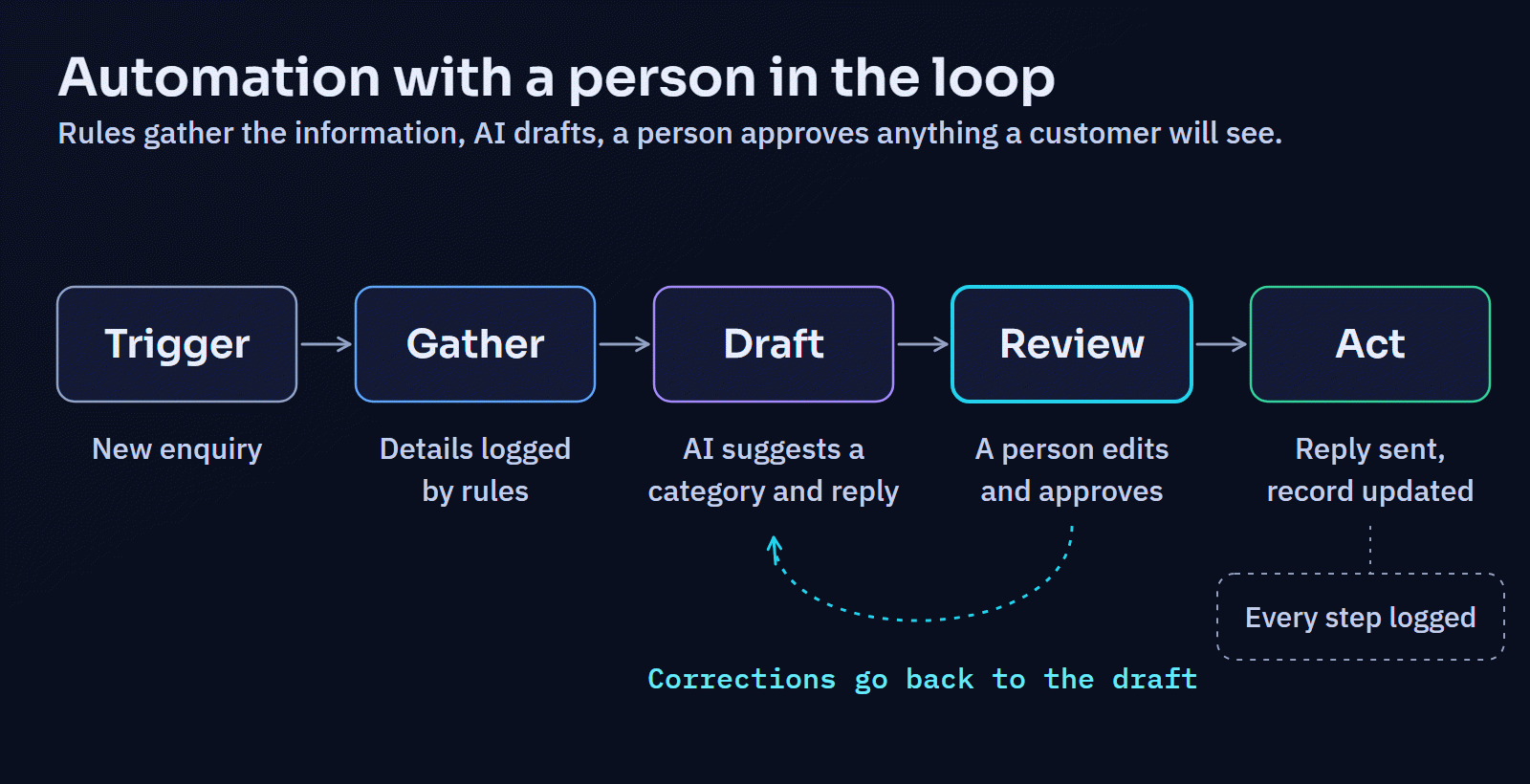
Some practical ways to build review in:
- Drafts are saved for approval rather than sent.
- Low-confidence or unusual cases are routed to a person automatically.
- A sample of automatically handled items is checked every week, even after the process seems reliable.
- Every automated action is logged, so it is possible to see what happened and why.
Privacy and security
Automations move data between systems, and AI services may process it on someone else's servers. Before connecting anything:
- Know where the data goes. Check whether the AI provider stores prompts, for how long, and whether they are used to train models. Business and API agreements often differ from consumer apps on exactly these points.
- Do not paste customer personal information into consumer AI tools that are not covered by an agreement suitable for business data.
- Give each automation the least access it needs. An assistant that drafts replies does not need permission to send them, delete records, or read every mailbox.
- Be careful when AI reads content from outside. Emails and web pages can contain instructions written to manipulate an AI system, a risk known as prompt injection. An automation that reads incoming email should not be able to take significant actions on the strength of what that email says.
- Check the privacy law that applies to you. Using personal information in new ways may require updating your privacy notice or obtaining consent.
For a structured way to think about these risks, the US National Institute of Standards and Technology publishes a free AI Risk Management Framework. It is written for organisations of any size and is a useful checklist even if you only adopt parts of it.
Integration considerations
Whether an automation keeps working depends less on the AI and more on how it is connected.
- Where does the data live? CRMs, accounting packages, booking systems and shared drives each have different ways of connecting. Check that the systems you use have an API or a reliable integration.
- What starts the process? A new form submission, a new email, a schedule, or a person pressing a button.
- What happens when something fails? Services go down and APIs change. A good integration retries sensibly, avoids doing the same action twice, and tells someone when it cannot complete.
- Build or buy? Off-the-shelf automation platforms connect popular apps quickly and are often the right first step. A custom integration makes sense when the workflow involves your own systems, specific business rules, larger volumes, or data that should not pass through another service.
- What does it cost to run? AI services and automation platforms usually charge by usage. Estimate the monthly cost at realistic volumes before committing.
How to tell whether it is worth it
Decide how you will judge the automation before you build it, and measure the current state first.
- Time: how long does the task take now, and how often? Afterwards, how long does the remaining human part take, including review?
- Quality: how often do mistakes or rework happen now, and afterwards?
- Speed for customers: how long until an enquiry gets a reply?
- Cost: subscriptions and usage fees, plus the time spent maintaining the automation.
Run a pilot for a few weeks with one workflow, compare against the baseline, and then decide to keep it, adjust it, or stop. Stopping is a legitimate outcome. An automation that saves twenty minutes a week but needs an hour of fixing a month is not worth keeping, and it is far better to find that out in a pilot.
A simple way to start
- List recurring tasks for a week or two.
- Pick one frequent, low-risk task with digital inputs.
- Map its steps and mark which need rules, which need language understanding, and which need a person's judgement.
- Decide what success looks like and measure the current state.
- Build the smallest version, with review built in.
- Pilot it, measure, and decide.
- Only then move on to the next workflow.
Where Digital Solutions can help
Digital Solutions builds applications, integrations and workflow automation for businesses whose processes have outgrown spreadsheets and disconnected tools: API and third-party integrations, Laravel business applications, and the forms, notifications and data flows around them. AI is used as one implementation method where a step genuinely needs it, always with review and logging around it, rather than sold as a product of its own. The multi-channel messaging portal case study and the workflow demonstrations in the Engineering Lab show the kind of systems involved.
If there is a process in your business that eats more time than it should, describe it. The first useful step is often working out whether it needs AI at all.