Platforms
WordPress vs. Custom Website Development: How to Choose the Right Approach
A fair comparison of WordPress and custom development: where each fits, what maintenance and ownership involve, what drives cost, and a short framework for deciding.
On this page
"Should we use WordPress or have something custom built?" is one of the first questions in almost every website project, and it is often answered by whoever the business happens to ask. A WordPress agency recommends WordPress; a software developer recommends custom code. Both can be right, for different projects.
A more useful question is which approach fits your content, your workflows, the people who will run the site, and what it will cost to own over the next three to five years, not just to launch. This article sets out the trade-offs plainly so you can make that judgement, or at least ask better questions of whoever quotes for the work.
What the two options actually mean
WordPress is an open-source content management system (CMS). It began as a blogging tool and now runs a very large share of the web, from small brochure sites to large publications. A WordPress site is built from the WordPress core, a theme that controls how it looks, and plugins that add features such as forms, search optimisation, e-commerce or multilingual content. Some sites are built with a page builder (such as Elementor, Divi or the built-in block editor) that lets editors arrange layouts visually. The self-hosted software from WordPress.org is free to use; WordPress.com is a separate hosted service with its own plans and limits.
Custom development means the site or application is written specifically for you, usually on a web framework such as Laravel (PHP), Django (Python) or Rails (Ruby), or as a modern JavaScript application. Nothing is there unless someone built it, which is both the main advantage and the main cost.
In practice this is a spectrum rather than a choice between two boxes:
- An off-the-shelf WordPress theme with plugins.
- WordPress with a custom-built theme and some custom plugins written for the business.
- WordPress used only as a content editor ("headless"), with a separately built front end.
- A custom application that includes a simple content editor for the pages that need one.
- A fully custom application with no general-purpose CMS at all.
Many good projects sit in the middle of that list.
When WordPress is a strong fit
WordPress is at its best when the website is mainly content: pages, articles, services, case studies, team profiles, events. Signs it will suit you:
- Non-technical people need to publish and edit regularly, and they benefit from an editor many people already know.
- Your features are common ones that mature, well-maintained plugins already handle well: contact forms, SEO metadata, redirects, a straightforward shop, bookings, multilingual pages.
- You want to launch relatively quickly and refine afterwards.
- You want a wide choice of people who can work on the site later. WordPress skills are widely available, which reduces your dependence on one supplier.
- You can commit to maintenance. Core, theme and plugin updates are a routine part of owning a WordPress site.
When custom development is a strong fit
Custom development earns its cost when the website is really an application: something people log in to, that holds structured business data, or that runs a process.
- The core of the project is a workflow: client portals, booking or quoting systems with business rules, internal tools, dashboards, approval processes.
- You have a complex data model, such as records that relate to each other in ways a CMS was not designed for, or data that must be validated strictly.
- Several systems need to talk to each other reliably, such as a CRM, an accounting package, a payment provider or an internal database, with clear error handling.
- Access control matters: different roles see different information, and that separation must be dependable.
- You have found yourself combining many plugins to approximate one feature, and the result is fragile or slow.
- Performance or security requirements are unusual, and you want full control over what code runs.
A side-by-side comparison
| Consideration | WordPress | Custom development |
|---|---|---|
| Content editing | Familiar editor out of the box | Only what is built; can be tailored exactly to the content |
| Common features | Often available as plugins | Built or integrated individually |
| Unique workflows and business rules | Possible through custom plugins; can become complex | Designed around them from the start |
| Time to first launch | Usually shorter for content sites | Usually longer; depends heavily on scope |
| Ongoing maintenance | Frequent core, theme and plugin updates | Framework and dependency updates; fewer moving parts from third parties |
| Security exposure | Widely used, so widely targeted; plugin quality varies | Smaller, less visible surface; depends entirely on the quality of the build |
| Performance | Depends on theme, builder, plugins and caching | Depends on the build; nothing loads that was not intended |
| Availability of developers | Very wide | Depends on the framework chosen |
| Ownership and portability | Open source (GPL); content is portable; premium plugins may be subscriptions | You should own the code by contract; portability depends on documentation |
Neither column wins outright. The rows that matter most depend on what the site is for.
Maintenance and security
Every website needs maintenance; the difference is where the work comes from.
On WordPress, most security issues come from plugins and themes rather than from WordPress core, which is maintained carefully and patched quickly. A site with a few well-maintained plugins from reputable developers, kept up to date, is a very different risk from one with thirty plugins installed over the years, some abandoned by their authors. Updates also occasionally conflict with each other, which is why it is good practice to apply them on a staging copy first.
On a custom build, there is far less third-party code, so there are fewer updates and a smaller, less-targeted attack surface. But all of the security depends on the quality of the original build and on someone continuing to update the framework and its dependencies. An unmaintained custom application ages just as badly as an unmaintained WordPress site, and it can be harder to hand to a new developer if it was not documented.
Either way, the same essentials apply: updates, tested backups, strong authentication and someone responsible for them. Our website maintenance and security checklist covers them in detail.
Performance
Neither approach is inherently fast or slow. WordPress sites become slow when a heavy theme or page builder loads code for every feature on every page, when plugins accumulate, or when there is no page caching. A well-built WordPress theme on good hosting with caching can be very fast. A custom build starts lean because nothing is included by accident, but it can still be slow if it is built carelessly. If speed is a priority, ask how it will be measured rather than which platform is "faster"; how to improve website speed explains what to measure.
Long-term ownership
Ask these questions whichever route you take:
- Who owns the code and the content? With WordPress, the core software is open source and your content can be exported. With a custom build, the contract should state that you own the code written for you, or at least have a licence to use and modify it.
- Is anything rented? Premium plugins, themes and page builders are often annual subscriptions, and SaaS website builders can be hard to leave. Know which parts you would lose if a subscription lapsed.
- Could another developer take over? This depends on documentation, sensible structure and the use of mainstream tools. Ask for a handover document as part of the project.
- Where is it hosted, and who has the accounts? The domain, hosting and any third-party services should be in your name, with access given to developers rather than owned by them.
What drives the cost
Prices vary too much by scope and region for a general figure to be useful, so it is more helpful to understand what you are paying for.
- Initial build. For WordPress, this depends on whether the theme is off the shelf or custom built, and how much custom functionality is needed. For a custom build, it depends mainly on the number of features, roles and integrations.
- Licences and subscriptions. Premium plugins and themes, page builders, and any paid services the site connects to.
- Hosting. Managed WordPress hosting, or a server or platform suitable for the application.
- Maintenance. Updates, monitoring, backups and small fixes, whether done in-house or by a developer.
- Change over time. New pages and features in later years. A site that is easy to change keeps this cost down; a fragile one makes every change expensive.
When comparing quotes, ask each supplier to break their estimate into these parts and to say what is excluded. Two quotes for "a website" can describe very different projects.
A short decision framework
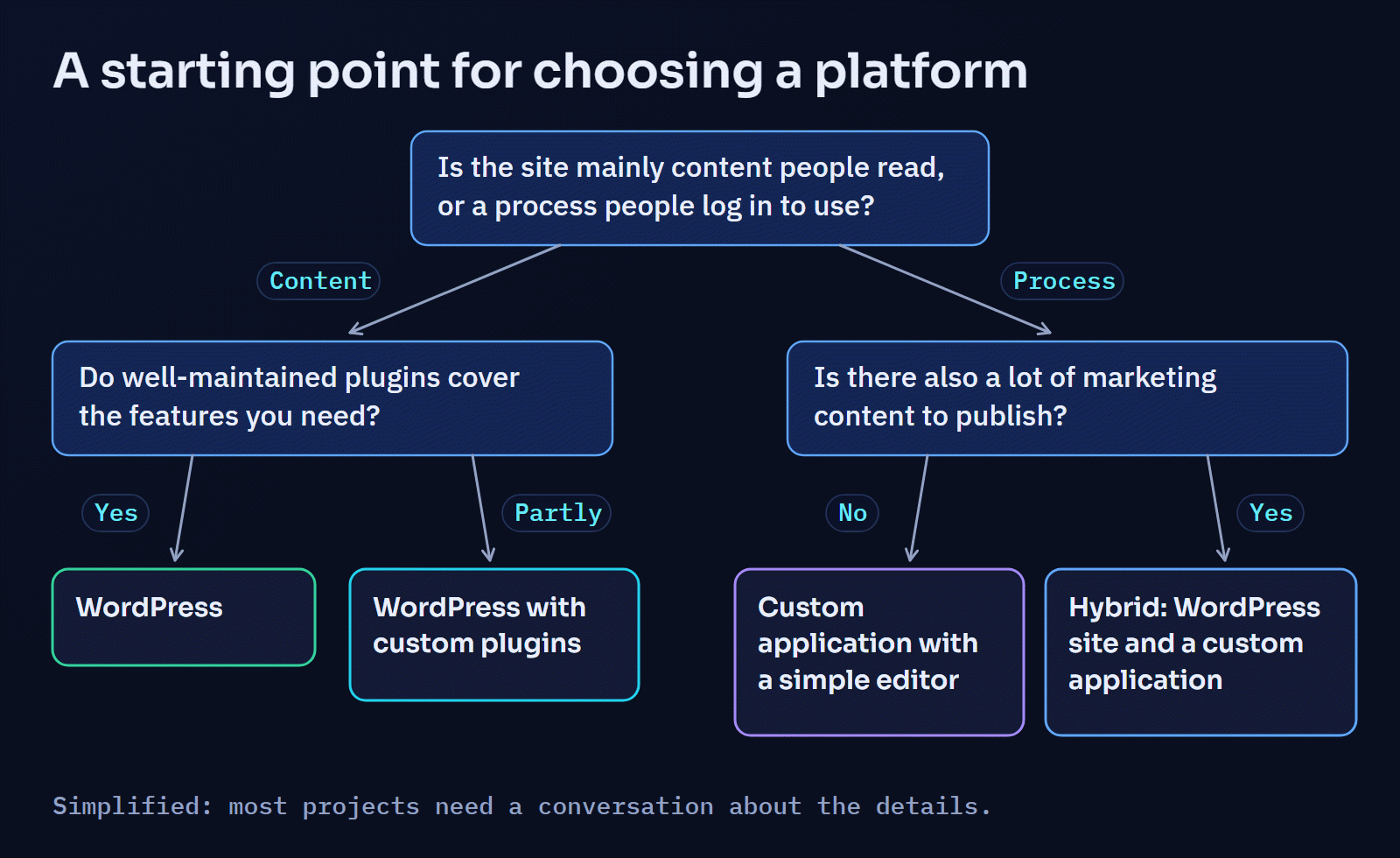
Answer these for your project:
- Is the website mainly content that people read, or a process that people log in to use?
- How often will non-technical staff publish or change content, and how much freedom do they need?
- Which features are standard, and which are specific to how your business works?
- Which other systems must the website exchange data with, and how reliable must that be?
- Who will maintain the site after launch, and how much time or budget is there for it?
- What would it cost you if the site were unavailable for a day, or if data leaked?
- How likely is the site to need significant new features in the next three years?
If your answers lean towards content, standard features and frequent editing, WordPress is usually the sensible choice. If they lean towards workflows, data, integrations and roles, a custom application is usually worth the extra investment. If they point both ways, a hybrid, typically WordPress for the marketing site and a separate application for the logged-in part, often gives the best of both.
Where Digital Solutions fits
Digital Solutions builds on both sides of this decision, which means the recommendation does not depend on which platform we sell. On the WordPress side, that means custom themes, plugins and integrations built like software; you can see the approach on the WordPress and PHP page and in the WordPress custom systems case study. On the application side, it means Laravel applications, portals and integrations, such as the HR information system documented in the case studies.
If you are weighing up the two for a specific project, describe what the site needs to do. You will get an honest view of which approach fits, including when the simpler option is the better one.