Technical SEO
A Technical SEO Checklist for Business Websites
The technical foundations that let search engines find, crawl, index and understand a business website, with the common mistakes and what a checklist cannot promise.
On this page
- 1. Crawling: can search engines reach your pages?
- 2. Indexing: is the right version of each page indexed?
- 3. XML sitemaps: a clean list of what you want indexed
- 4. Titles, descriptions and other metadata
- 5. Headings and semantic HTML
- 6. Structured data
- 7. Internal linking
- 8. Images
- 9. Speed and page experience
- 10. Mobile and rendering
- 11. HTTPS and site security
- 12. Search Console: verify, submit and monitor
- After a redesign or migration
- The checklist at a glance
- What a checklist cannot do
- Getting help
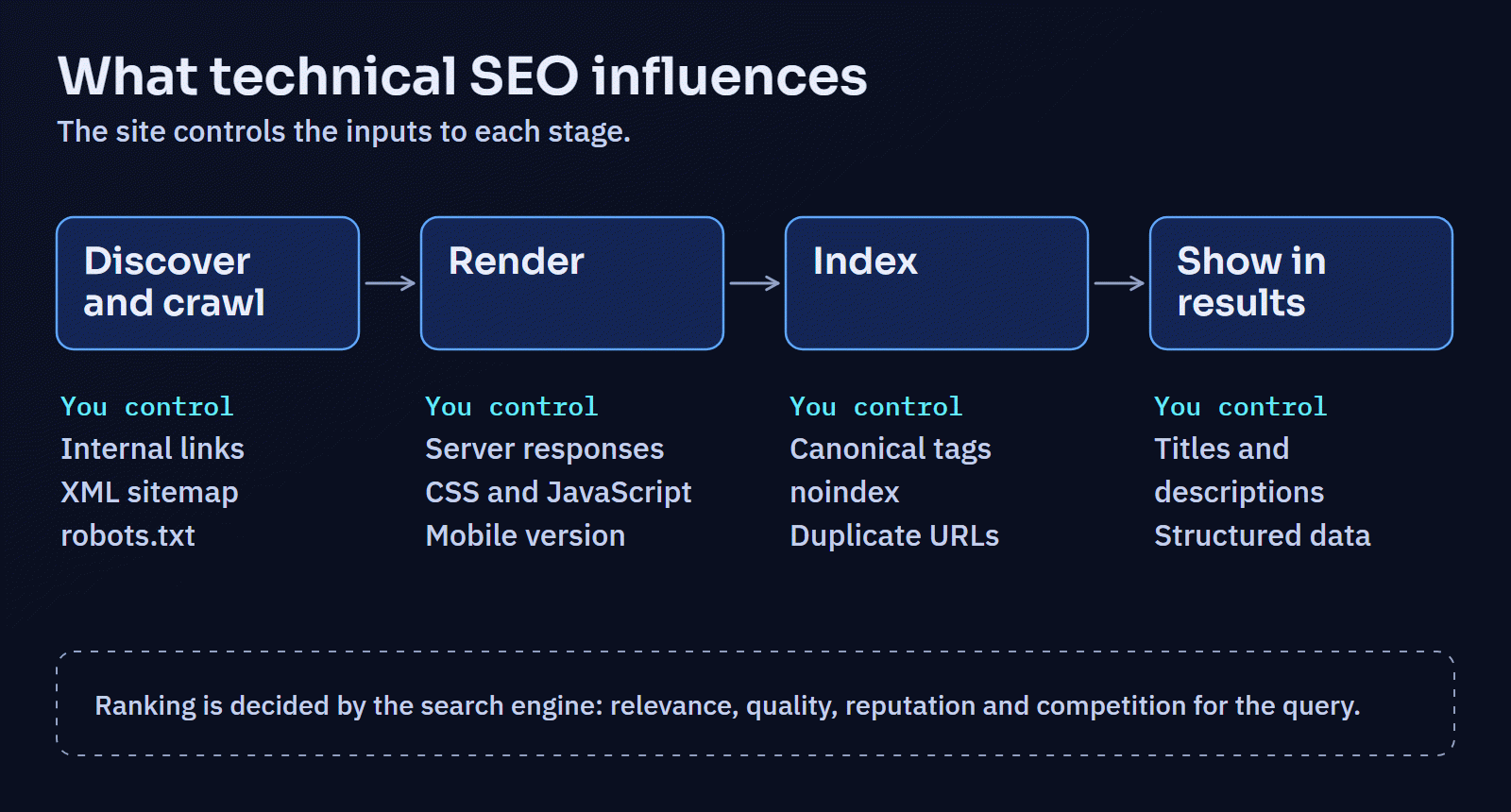
Technical SEO is the part of search optimisation that deals with whether search engines can find your pages, read them, understand what they are about, and choose the right version to show. It is the plumbing. Good plumbing does not make a page rank on its own; relevance, quality, and the competition for a query matter far more. But broken plumbing can stop a good page from being found at all, and it is usually the part a business can fix most directly.
This checklist covers the technical foundations a business website should have, explains why each one matters, and notes the mistakes that come up most often. It is ordered roughly the way a search engine meets your site: first discovering and crawling pages, then deciding what to index, then understanding and presenting them.
1. Crawling: can search engines reach your pages?
Search engines discover pages mainly by following links and by reading sitemaps, then request ("crawl") them.
- Check
robots.txt. It lives at/robots.txtand tells crawlers which paths not to request. Make sure it does not block pages you want found, or the CSS and JavaScript files needed to render them. Google's introduction to robots.txt explains the format. - Understand what
robots.txtdoes not do. Blocking a URL stops it being crawled, not indexed. A blocked page that is linked from elsewhere can still appear in results, without a description. To keep a page out of search results, let it be crawled and give it anoindexdirective instead. Androbots.txtis not security: it is public, and anyone can read the paths listed in it. Private areas need authentication. - Link to every important page from normal HTML links. Use
<a href="…">links that work without JavaScript. Pages that are only reachable through a search box, a form or a script are hard for crawlers to discover. - Avoid orphan pages. A page with no internal links pointing to it is easy to forget and hard for search engines to judge. Every page that matters should be linked from somewhere sensible.
- Fix server errors and redirect chains. Pages that return 5xx errors waste crawling and may drop out of the index. Redirects should go straight to the final URL in one step, not through a chain of several, and never in a loop.
2. Indexing: is the right version of each page indexed?
Once a page is crawled, the search engine decides whether to add it to its index, and which URL represents it.
- Use
noindexdeliberately. Login pages, admin areas, internal search results, thank-you pages and thin utility pages usually do not belong in search results. Mark them with<meta name="robots" content="noindex">or anX-Robots-TagHTTP header. - Give every indexable page a canonical URL. A
<link rel="canonical">tag states the preferred URL for a page. Use absolute URLs, point each page at itself unless it is genuinely a duplicate, and make the canonical match the URL you link to internally and list in the sitemap. Google treats a canonical as a strong signal rather than a command; its guide to consolidating duplicate URLs explains how it chooses. - Never canonicalise unrelated pages to the homepage. It is a common shortcut in themes and plugins, and it tells the search engine that those pages are not worth indexing in their own right.
- Remove duplicate versions of the same page.
httpandhttps,wwwand non-www, a trailing slash or none,index.phpin the path, and tracking parameters can all produce several URLs for one page. Pick one form and redirect the others to it with a permanent (301) redirect. - Return real status codes. A page that does not exist should return a 404 (or 410 if it is gone for good), not a "page not found" message with a 200 status. Search engines call these "soft 404s" and they confuse indexing.
- Handle filtered and paginated lists sensibly. Filter combinations and sort orders can generate thousands of near-identical URLs. Keep the main listing indexable, and keep filtered variations out of the index unless they are genuinely useful landing pages.
3. XML sitemaps: a clean list of what you want indexed
A sitemap is a file listing the URLs you want search engines to know about. It helps discovery, especially for new or deep pages, but it does not force anything to be indexed.
- List only canonical, indexable URLs that return 200. No redirects, no 404s, no pages marked
noindex, no unpublished drafts. A sitemap full of URLs you do not want indexed sends mixed signals. - Keep
lastmodhonest. Google uses the last-modified date when it is consistently accurate, and ignores the optionalpriorityandchangefreqfields. Only updatelastmodwhen the content meaningfully changes. - Reference the sitemap in
robots.txtwith aSitemap:line, and submit it in Search Console. Google's sitemaps overview covers size limits and formats. - Generate it automatically from the same data that publishes the pages, so new pages appear and removed pages disappear without anyone remembering to edit a file.
4. Titles, descriptions and other metadata
- Write a unique title for every page. The title is one of the clearest signals of what a page is about and usually becomes the headline in search results. Describe the page plainly, put the most specific words first, and keep it short enough not to be cut off.
- Write a useful meta description. It does not directly affect ranking, and search engines often rewrite it, but a clear summary of what the page offers can make the result more likely to be chosen.
- Avoid duplicates and templates. Hundreds of pages titled "Services | Company" or sharing one description make it harder for search engines, and people, to tell them apart.
- Set the language with
<html lang="en">(or your language), and add Open Graph tags so links shared on social platforms show the right title, description and image. Open Graph does not affect ranking, but it affects how your pages look when shared.
5. Headings and semantic HTML
Search engines, like assistive technologies, use the structure of a page to understand it.
- One main heading, then a logical outline. A single
<h1>that states the topic, followed by<h2>sections and<h3>subsections in order, without using heading tags just to make text larger. - Use the right element for the job:
<nav>for navigation,<main>for the main content,<article>for an article, lists for lists and tables for tabular data. - Write descriptive link text. "Read the case study on our booking system" tells both readers and search engines where a link goes; "click here" tells them nothing.
- Give informative images meaningful alt text, and decorative images an empty
alt=""so they are skipped.
Much of this overlaps with accessibility, and work on one usually improves the other.
6. Structured data
Structured data is machine-readable information, usually written in JSON-LD, that describes what a page contains: an organisation, an article, a product, a breadcrumb trail. It can make a page eligible for enhanced results, though it never guarantees them. Google's introduction to structured data lists the supported types.
- Describe only what is visibly on the page. Marking up reviews, ratings or prices that are not shown, or that are not genuine, is against search engine guidelines and can lead to penalties.
- Start with the basics:
OrganizationandWebSitefor the site,BreadcrumbListfor navigation trails, andArticleorBlogPostingfor articles. - Validate it with Google's Rich Results Test and the Schema Markup Validator, and recheck after template changes.
7. Internal linking
Internal links help search engines discover pages, understand how they relate, and judge which ones matter most.
- Link from general pages to specific ones, and back: a service overview to each service, each service to related case studies and articles, and articles to the services they discuss.
- Use natural, descriptive anchor text. Vary it as you would in normal writing; repeating the same exact keyword phrase in every link looks manipulative and reads badly.
- Keep important pages close to the homepage. A page that takes six clicks to reach is likely to be treated as less important than one that takes two.
- Check for broken internal links after every redesign or content clean-up.
8. Images
- Use descriptive file names and alt text where the image carries information.
- Serve modern, compressed formats at sensible sizes, with
widthandheightset to prevent layout shift. - Lazy-load images below the fold, but not the main image at the top of the page.
9. Speed and page experience
Google uses Core Web Vitals, measured from real visitors, as part of its page experience signals. A fast page will not outrank a more relevant one, but a slow one frustrates the people who do arrive. The Core Web Vitals report in Search Console shows how your pages perform for real users. Our guide to improving website speed covers how to measure and fix the common causes.
10. Mobile and rendering
- Assume the mobile version is the one that counts. Google predominantly uses the mobile version of a page for indexing, so content, links and structured data must be present on mobile, not only on desktop.
- Check that content rendered by JavaScript is visible to Google. The URL Inspection tool in Search Console shows the rendered HTML Google sees. Important text and links should be present in that output.
11. HTTPS and site security
Serve every page over HTTPS, redirect HTTP to HTTPS, renew certificates automatically, and avoid "mixed content" (insecure images or scripts on secure pages). A hacked site can be flagged in search results, which is one more reason security and maintenance belong on the same list; our maintenance and security checklist covers the practicalities.
12. Search Console: verify, submit and monitor
Google Search Console is free and is the only direct view of how Google sees your site.
- Verify ownership, ideally as a domain property (through DNS) so that every protocol and subdomain is included.
- Submit your sitemap.
- Review the Page indexing report to see which pages are indexed and why others are not. Many "not indexed" reasons are normal (duplicates, redirects,
noindexpages); look for pages you want indexed that are missing. - Use URL Inspection to check individual pages after you change them, and to request indexing of important new pages.
- Watch the Core Web Vitals and Security issues reports, and read any messages Google sends.
Bing Webmaster Tools offers a similar view for Bing and is worth setting up too.
After a redesign or migration
Most serious technical SEO damage happens during a redesign or a move to a new platform or domain. Before launch:
- Map every old URL to its new equivalent and set up permanent redirects for any that change. Do not redirect everything to the homepage.
- Carry over titles, descriptions, headings and content for pages that perform well, unless there is a reason to change them.
- Check that the staging site's
noindexor password protection has not been copied to production. It is one of the most common and most damaging launch mistakes. - After launch, check
robots.txt, submit the new sitemap, crawl the site for broken links and redirect chains, and watch the indexing and performance reports closely for several weeks.
The checklist at a glance
| Area | Check |
|---|---|
| Crawling | robots.txt blocks nothing important; important pages linked with HTML links; no orphan pages; no 5xx errors; no redirect chains or loops |
| Indexing | Private and thin pages noindex; every page has a correct self-referencing canonical; one URL per page; real 404s |
| Sitemap | Only canonical, indexable 200 URLs; accurate lastmod; listed in robots.txt; submitted in Search Console |
| Metadata | Unique, descriptive titles and descriptions; language set; Open Graph tags |
| Structure | One h1; logical heading order; semantic landmarks; descriptive links; alt text |
| Structured data | Accurate JSON-LD for what is on the page; validated |
| Internal links | Hubs link to details and back; descriptive anchors; no broken links |
| Images | Sensible sizes and formats; dimensions set; main image not lazy-loaded |
| Performance | Core Web Vitals reviewed from field data |
| Mobile | Same content and links on mobile; JavaScript content visible to Google |
| Security | HTTPS everywhere; no mixed content |
| Monitoring | Search Console verified; indexing and Core Web Vitals reviewed regularly |
What a checklist cannot do
Passing every item above means search engines can find, read and understand your site. It does not mean the site will rank well. Whether a page ranks depends on how well it answers the searcher's question compared with every other page competing for that query, on the site's reputation, and on many signals no checklist controls. Be wary of anyone who guarantees rankings or traffic. The honest promise of technical SEO is narrower and still valuable: nothing on your side of the plumbing is holding good content back.
Getting help
Technical SEO work is part of Digital Solutions' SEO, performance and accessibility service, alongside the related technical SEO and accessibility work. It is technical implementation only: audits and fixes for metadata, structured data, sitemaps, robots rules, redirects and performance, and SEO checks after a migration or redesign; not link building, paid advertising or ranking guarantees. If you are planning a redesign or suspect something is holding your site back, get in touch for a review of what is actually there.